After about a week of extra tinkering and applying some fixes following hand in, I figured it's time to migrate my project over from Unreal Engine 4.27 to 5.1. Predominantly to figure out Lumen and with a complete scene at the ready with varying interior lighting shots I knew this would be the perfect opportunity to do so.

Please do keep in mind this isn’t an exact comprehensive guide on how to upgrade projects from one version to another. For that I highly recommend checking out Matt Oztalay and Galen Davis guide by Epic Games (Davis & Oztalay, 2022) to do so cited at the bottom of my post. I was able to easily follow along and the results came out great so be sure to backup your project and give it a shot!
Converting the Diner)
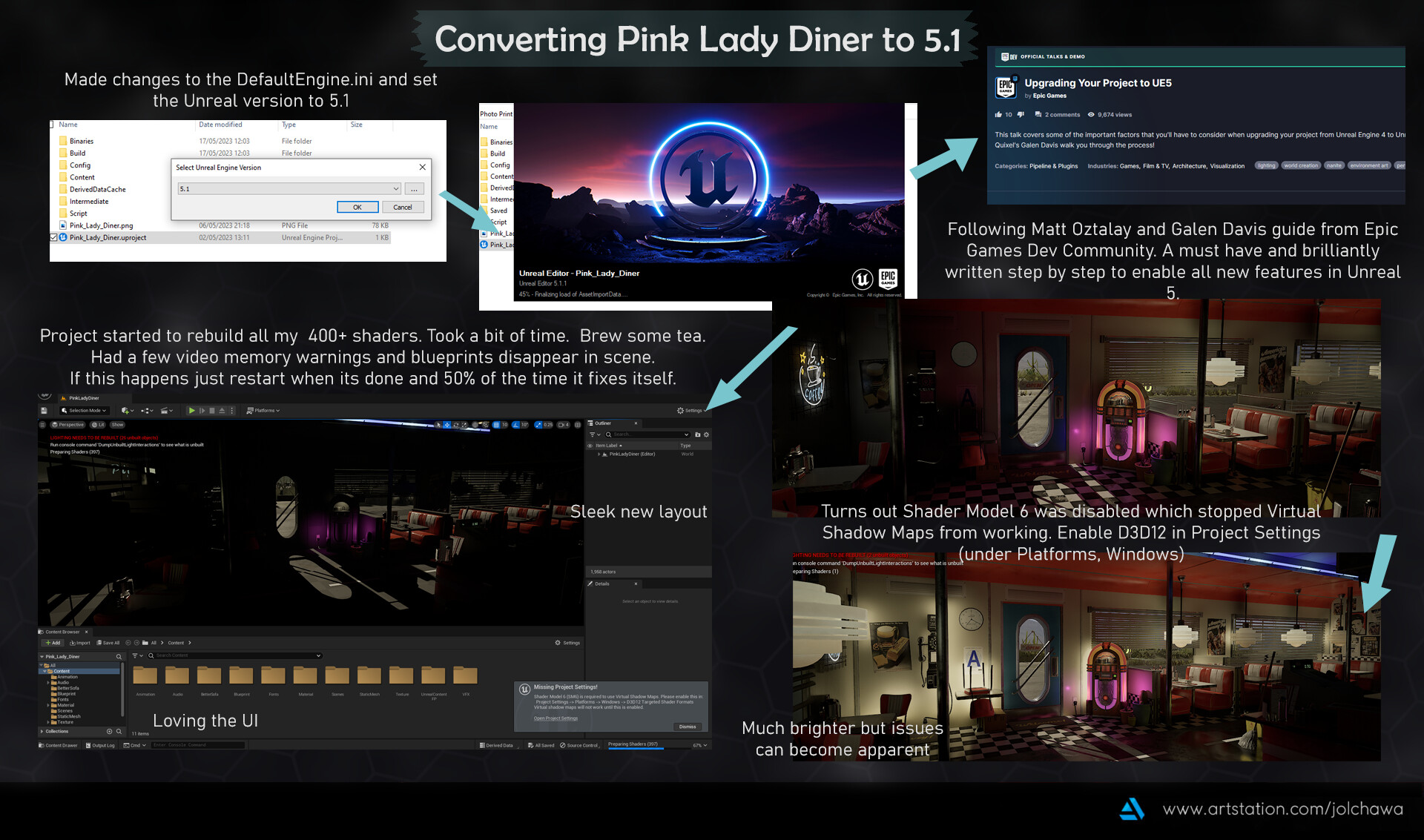
After changing the version for booting the project to Unreal 5.1, I recommend pasting the guides commands into the DefaultEngine.ini file for saving on some manual back and forths with restarting. The project did take a bit to load for the first time but was smooth sailing from there (after rebuilding 400+ shaders). Don’t forget to also enable Shader Model 6 since it prevented Virtual Shadow Maps from working without it. As you can see below problems have already arisen so let's get to fixing them.
Fixing Light Bleed)

The biggest issue I had was a lot of light bleeding with Lumen through the sides and bottom of my walls. This was due to 2 main issues; lack of thickness in the walls and no two sided materials to prevent light leaking in. To resolve these issues I found the quickest way was to use the Unreal Engines cube combined with some dark materials to block out the light where it became most apparent. However for future projects I know when modelling interior spaces or ones that will be hit with directional lights it would be better practice to model in more geometry to help bulk out any light bleeding. Another recommendation is to play around with the indirect lighting values on lights to boost the lighting bounces insides + ensure you have disabled static lighting. I have had a lot of problems trying to have both Lumen and static baked lights working which I can only assume to be some sort of clash with lightmaps/virtual shadow maps. So by disabling static lighting you can use Lumen's full realtime potential and try to avoid any odd artefacts from lightmaps. Don't forget to also set lights to movable/stationary so they don’t stop working altogether if static.
Reflections and Global Illumination Tests) Toilets

Another issue that I had was with reflections, especially with my toilets. The entire room is angled towards the large mirror and previously I had set up a planar clip reflection to give off a mirror quality reflection in Unreal 4. However with what I can assume to be the amount of gpu stress Lumen and any raytracing does in Unreal 5, keeping the reflection plane led to drastic framerate drops. To the point of which I suffered a crash and couldn't enter the toilets to adjust anything if it was rendered in view. So I deleted the plane from the hierarchy and started back to square one, with a square reflection capture (additionally don't forget to disable the global clip plane in settings if you are not using any planar reflection). Here are some results from my testing with different global illumination methods and reflections alike.
My summary of findings can be concluded that the least problematic method for my scene was using lumen's global illumination and lumen’s reflections with added hit lighting ray trace settings. As whilst both ray tracing and screen space did provide some interesting results in illuminating the toilets they both were quite harsh and overblown in their shadows. I’m sure with more fiddling in post process settings I could have maybe turned this down a bit but lumen was the easiest and less performance intensive on my end to get good lighting with little fuss.
Moving onto reflections with lumen I found that the raytrace gave the most accurate and best looking reflections. However I had a strange orange tint from what I can assume to be maybe my directional or skylight conflicting with the rays being cast. Screen space ranked the worst as it was horrendously dark for some reason kind of eldritch in nature. I have a feeling my reflection capture wasn’t being picked up well or there was another hidden setting I had missed to upscale or tick. I ended up going with lumen since it removed the orange/yellowing tint issue found in ray trace however it also had its set of problems. There were two methods of raytrace for lumen to get data from the most accurate being Hit Lighting. However even between that and Surface Cache (which I can assume to be better for performance) the back wall had a dark gradient near the ceiling. I tried resolving this by buffing out the walls with cubes but the issue did not go away, so I can only assume it's my own wall meshes at fault.
Reflections and Global Illumination Tests) Front Seating

Moving to another location the front seating area was another hotspot for lighting and reflections I wanted to test. As you can see there are some drastic differences in renders, especially looking at base ray tracing for global illumination. Unfortunately my performance was drastically chugging when upping samples and bounces and I decided not to tempt the Unreal gods after already suffering a few crashes at this point. With a more simple scene I would love to be able to try and go crazy with the values of raytrace since my GPU can support it (RTX 3070).
Generally lumen proved best value wise and performance. However when going to reflections the minimal difference you can realistically spot here can be seen in the posters/payphone. Hit lighting raytrace for lumen is a winner once again as base raytracing had some strange dark spots on the metal frame of the door and jukebox. The scene could be lacking enough bounces or maybe picking something up from the checker floor. Either way let's move onto some more notable reflection differences I found by focusing on my mop puddles.
Reflections and Puddles)
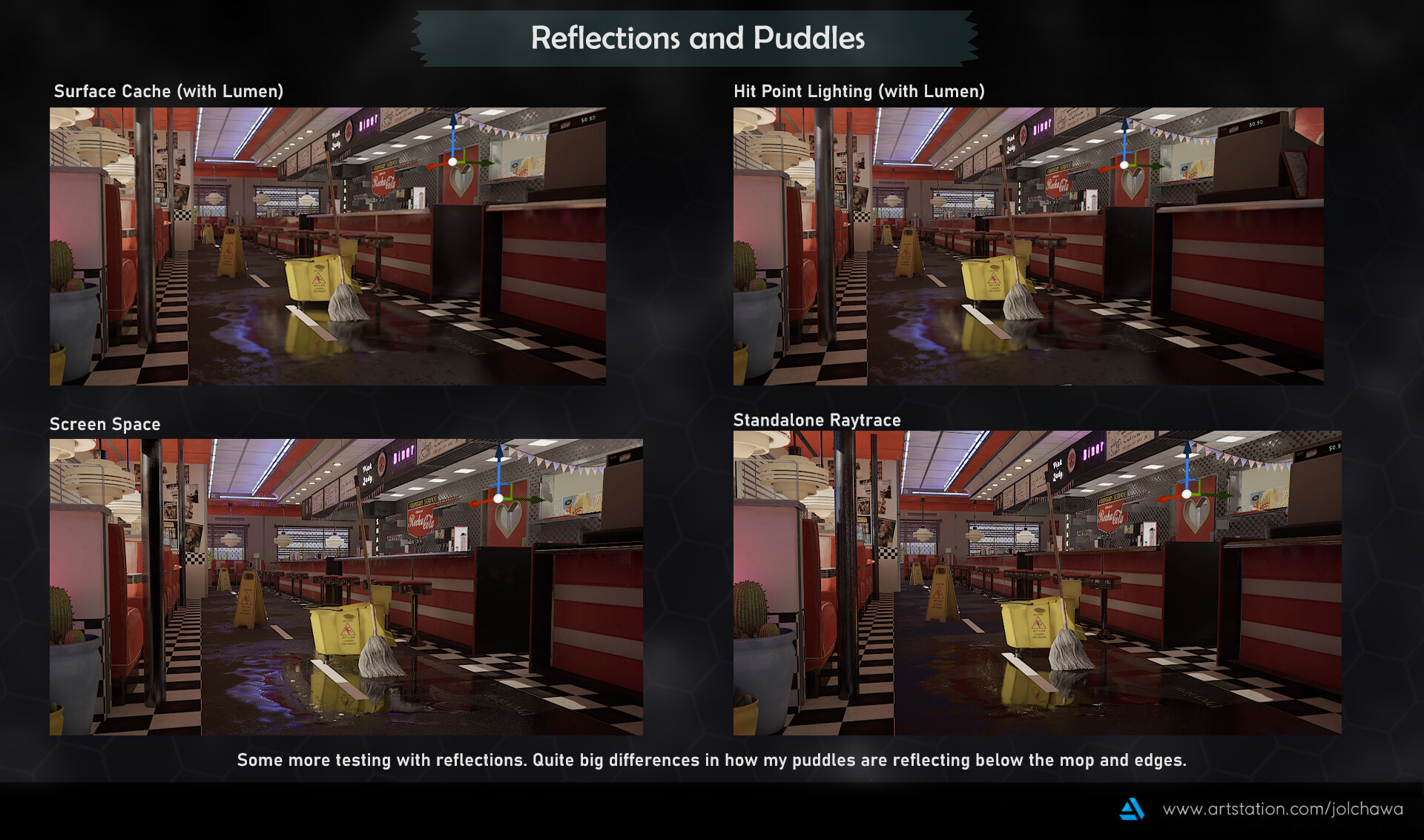
To make the tests more short and simple I maintained lumen for global illumination through all these shots the differences coming in at the reflection renderers. Surface Cache with lumen proved to boost the nearby colours as it was picking up a lot of the yellow mop bucket whilst its more precise cousin the Hit Point Lighting setting cast a darker outline there since it was underneath. Screen Space definitely won the award for the most slippery as the roughness bounced and shone right back up making for a very big slippery hazard. However the standalone raytrace proved to be more realistic in a sense of the puddle being absorbed to the rubber mat and darkening the overall reflection even with metallic points such as the back diamond wall. In conclusion, quite fun to render out and I would happily use all of these settings on a project by project basis depending on what I am looking for in terms of clarity, colour or darkness for realistic measures in puddles/roughness.
UE5 Diner Short)
Having fixed up some textures on my sofa mesh and overall roughness values to try and work in tandem with Lumen I went to re render my short video set to “A Teenager in Love” by Dion DiMucci (DiMucci, 2008) now into Unreal 5.1. I’m quite happy with the result as the level sequencer had held up well and generally lighting and shadow proved to be a step up in UE5. If you want to watch a side by side comparison I edited both my renders down below for ease of watching.
UE4 VS UE5 Diner Short Comparison Video)
One major gripe I had when comparing my shots was the storage room scene, as it had considerably suffered in quality compared to its Unreal 4 counterpart. This was primarily due to the render struggling to get the scene dark when being slotted so close to other surrounding rooms. Filled with hanging lights, neon and other large attenuative lighting this bled through the walls into the storage section. I did try my best by reducing overlap, indirect lighting and even slotting cubes between what little space was on the walls but to little change. For future reference I would highly recommend considering how far dark interior spaces are in comparison to their light counterparts in the floorplan to try and avoid issues such as this from the get go. However for the time being I am still pleased with the other 75% of the render.
Comprehensive Static Render Comparison Video)
Wanted a more direct comparison of all my static render shots as well? Well look no further I have also made a short video with that too. All my shots from UE4 are shown for a few seconds before crossfading to the UE5 counterparts for easy comparison. I recommend checking it out as the differences in many shots are like night and day. In the most positive of ways, minus the storage room but we don't talk about that. If you like the music the full track is called “Ain't That A Shame” by Fats Domino (Domino, 2021) and can be found cited in my bibliography below.
Summary)
In conclusion Unreal 5.1 is extremely impressive and fun to use! I must admit that despite the small issues with reflections and a handful of crashes I’ve had by upping some values a tad bit too far, the project looks substantially better. My overall lighting looks way more sunset in nature and warm to match the cosy retro vibes the diner gives off. Generally fitting a more mellow time when having to close up, mop and take care of the diner as the sun begins to simmer down. I have learned quite a bit of dos and don’ts having brought my project up through some drastic version changes and will definitely keep this knowledge handy when working on my personal projects next. I definitely want to tackle making best use of Nanite as this project used a lot of translucency so I was a bit restricted in that case. There is also definitely a whole chunk of knowledge I have yet to learn about pushing my models and textures in UE5 so I can't wait to get around with more experimenting and learning. Thank you for reading and I must once again thank Matt Oztalay and Galen Davis (Davis & Oztalay, 2022) for making their fabulous guide as I would be greatly lost without them.
The Pink Lady Diner in UE5 - Artstation Post: https://www.artstation.com/artwork/aogvq2
Bibliography:
Davis, G. and Oztalay, M. (2022) Upgrading your project to UE5: Talks and demos, Epic Developer Community. Available at: https://dev.epicgames.com/community/learning/talks-and-demos/J5q/unreal-engine-upgrading-your-project-to-ue5#:~:text=You’ll%20be%20able%20to,versions%20before%20upgrading%20to%20UE5 . (Accessed: 14 May 2023).
(2021) Fats Domino - Ain’t That A Shame (1956) 4K . YouTube. Available at: https://www.youtube.com/watch?v=2FDYyf8Kqrs (Accessed: 14 May 2023).
DiMucci, D. (2008) A teenager in love-dion and the belmonts-original song, A teenager in love-dion and the belmonts. Available at: https://www.youtube.com/watch?v=o-Xvgv92GBc (Accessed: 14 May 2023).


